Dental Office IT Support: What Your Practice Really Needs
Dental office IT support is managed help for the technology a practice runs on: practice management software like Dentrix, Eaglesoft, or Open Dental, digital X-ray and imaging, operatory computers, the front-desk network, HIPAA security, and backups that can survive ransomware. Good support fixes problems fast during patient hours and prevents most of them in the first place.

A dental office can run without a lot of things. It can't run without the schedule, the X-ray sensor, or the server in the closet. When one of those goes down at 8am, you have a waiting room full of patients and a hygienist holding a sensor that suddenly doesn't talk to anything. That's not an IT ticket. That's a lost morning of production.
TL;DR: Dental practices need IT that knows imaging and practice management software, keeps patient data HIPAA-secure, and restores backups fast after ransomware. Try a restart before you call. Pay for proactive support, not just emergencies.

What Dental Office IT Support Covers
Practice management software. Dentrix, Eaglesoft, Open Dental, and the database server they live on.
Imaging. Sensors, pano and CBCT units, intraoral cameras, and the bridge software that ties them to the chart.
Operatory and front-desk computers. Patched, protected, and replaced on a schedule.
Network. Wired operatories, separate guest Wi-Fi, and a firewall that's actually managed.
Security and HIPAA. MFA, encryption, endpoint protection, and a risk analysis.
Backups. Nightly, offsite, and tested.
Help desk. A managed help desk that answers during patient hours. Ours is under 15 minutes for critical issues.
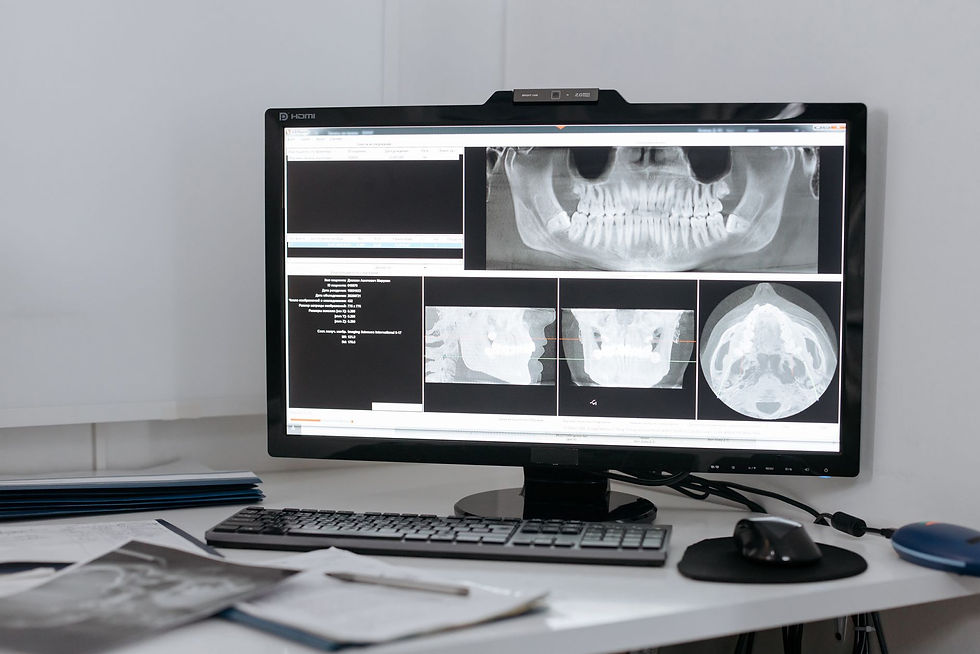
Dental IT Support Lives or Dies on Imaging
Imaging is where generic IT providers struggle. Sensors need specific drivers, the imaging software needs to match the practice management version, and a Windows update can break the bridge between them overnight.
Good dental IT support tests updates before they hit operatory machines, keeps a list of which software versions work together, and has a direct line to your imaging and software vendors. That last part matters. Nine times out of ten, a dental IT problem involves two vendors pointing at each other. Your IT provider should be the one who makes them stop.

HIPAA and Ransomware Are the Same Conversation
The American Dental Association's ransomware guidance is short and sensible. "Backing up your data regularly and keeping a secured copy offsite can help protect you from ransomware," it says, and "Training your staff on basic data security can help reduce the chances of your staff being susceptible to attacks."
Federal regulators add the paperwork side. After a phishing email led to a ransomware attack at an accounting firm holding patient data, OCR Director Paula M. Stannard said, as reported by HIPAA Journal: "A HIPAA risk analysis is essential for identifying where ePHI is stored and what security measures are needed to protect it."
So the HIPAA basics and the ransomware basics are the same list: risk analysis, MFA, encryption, patching, training, and backups ransomware can't reach. Our HIPAA audit services start with the risk analysis, and managed cybersecurity keeps watch after that.
I learned how much speed matters on a 3am call years ago. A virus was moving across a client's network, and the job was to contain it before the first person logged in. For a dental office, "before the first patient" is the deadline that counts.

Try This Before You Call Anyone
Here's my one strong opinion. Restart it first.
It sounds too simple to say out loud. But a huge share of "the sensor isn't working" and "Dentrix is frozen" calls clear up with a restart of the computer, the sensor's USB connection, or the imaging service. Even technical people forget this under pressure.
So: restart the workstation. Unplug and replug the sensor. If it still fails, then call. A good provider won't make you feel silly for skipping step one. They'll walk you through it. (We will. We've all been there.)

When You Don't Need Us for This
You're a single-dentist practice on cloud software. Dentrix Ascend or similar, a couple of computers, and a good imaging vendor may be enough. Turn on MFA and back up anything local.
Your software vendor already includes IT. Some do. Check what's covered before paying twice.
Where dental office IT support pays off: two or more doctors, an on-site server, multiple operatories with imaging, or a group with several locations. Also see our healthcare IT services page for clinics and larger practices.
Straight Answers About Dental IT
What does dental IT support include?
Practice management and imaging software support, operatory and front-desk computers, networking, HIPAA security, backups, and a help desk.
Do dental offices need HIPAA-compliant IT?
Yes. Dental practices are covered entities. They need a risk analysis, safeguards like encryption and access controls, and business associate agreements with vendors that touch patient data.
How do I protect my dental practice from ransomware?
Back up daily with an offsite copy ransomware can't reach, train staff on phishing, turn on MFA, keep systems patched, and test your restores.
Why does my dental imaging software keep crashing?
Common causes are driver conflicts after Windows updates, mismatched software versions, low disk space, or a failing USB connection. Restart first, then call support.

Still Stuck? Give Us a Call
If your current IT plan is "the office manager's cousin, when he's free," give us a call at 410-703-3857 or send us a note. We support practices across Maryland, Virginia, and DC, including Rockville.
We'll keep the chairs moving. Flossing is still on you.


Comments